
3 Tips on how to contact Instagram and get a response
Instagram is probably the fastest growing tech company these past 2 years and while that's a clear indicator that things are going well for them, such rapid growth also brings with it many problems in the aplicación - mostly technical and infrastructural - and that's why most of us users miss an effective way of contact Instagram and have them respond to us when we experience any of these issues.
It is not the first time we see how many users complain that the Instagram support service does not attend any of their requests and the truth is that it is something they should improve and a lot. On the other hand we understand that they are a little overwhelmed by the thousands of queries they receive daily, but that's something they should anticipate as the community of users of their platform grows.
How to get them to pay attention to you when you try to contact Instagram.
Since Instagram is sure to receive thousands of queries and suggestions on a daily basis, it's obvious that not all of them are going to get a response, so it never hurts to fall back on a few consejos or tricks to increase the likelihood that your query will be answered. 3 Tips on how to contact Instagram and get a response.
Before reading our recommendations, please first make sure that your question is not already solved in the Instagram help center. There's no point in applying our advice if you're going to contact Instagram to get a question solved in their help center, if you do that you'll never expect a reply from them. That said, here are our 3 particular consejos:
- Address them in their language. Instagram belongs to Fb and in case you don't remember, both are based in the state of California (United States), so English will be the official language of the company and of course of the Instagram support team.
We already did in his day the test of contacting the Twitter support team, we sent 2 messages with the same title, the same query and the same email address, the first of them we wrote in Spanish and the second in English. As a result, they only replied to the message in English -it took them only 4 days-, while we never received a reply to the query in Spanish despite having sent it a week before. The conclusion is that whatever the company is, if your query is not in their language do not expect a response from them. - Use their contact forms. To make sure Instagram gets your message, always use the contact forms they have for this purpose. You cánido use 2 forms:
For more detailed inquiriesTo report an error or bug in the application clic here. If you use this form, they recommend that you log in to Fb to use your account information to provide better service. Please note that Instagram's support team does not respond to all notifications they receive, but if it's a serious issue, they may contact you.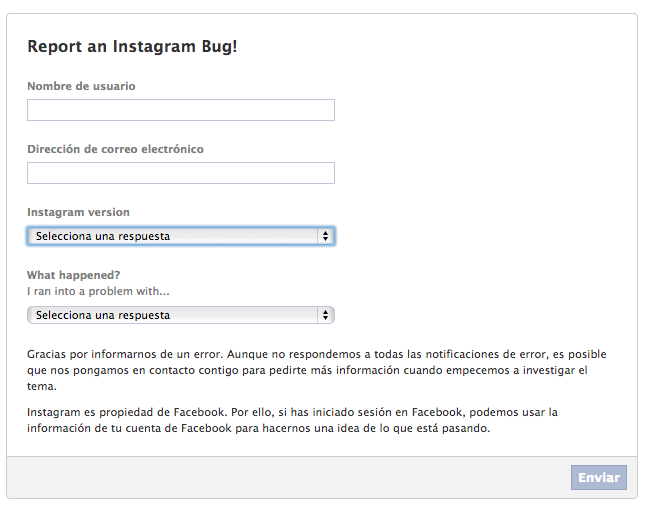
- For problems related to the Instagram login process you can use this form.
- Your Twitter account. Undoubtedly the best option of the 3, as it is a much more fluid, direct and updated daily. They probably won't answer you personally on Twitter, but they will surely answer your query faster and if they detect that it is a widespread problem, then they will solve it more urgently. In addition Twitter has something very useful and is that you can use your followers to make mention to @instagram tweeting your query, this way you will get much more attention.
As you perro see, these are small details that adding them together cánido have an effect when it comes to contact Instagram and make them take your queries seriously. With this we don't mean that every time you have a doubt you should resort to these techniques (if you abuse them you will probably get the opposite effect), just inform yourself before and if you see that the problem is repeated in other users, then act. 3 Tips on how to contact Instagram and get a response.
Si quieres conocer otros artículos parecidos a 3 Tips on how to contact Instagram and get a response puedes visitar la categoría Apps.